An AI-first approach to product development
My current process for building SaaS features with Claude Code, the GitHub, Vercel and AWS CLIs, Sentry and Trello, and no IDE, for roughly 10x velocity.
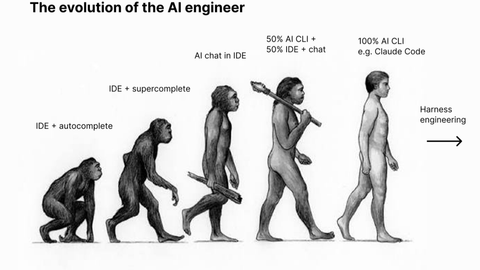
I’m sharing my current process for building software features in a SaaS product using an AI-first approach.
I started the project just before the first major ChatGPT release, so the initial build was done in the usual, pre-AI way; code written in an IDE (VSCode), Figma for designs, Trello for project tracking, among other services.
As it became clear AI tools could greatly accelerate the development process I was keen to see just how effective this could be.
The goal
At least 10x increase in development velocity while improving code quality and test coverage.
Tooling
- Claude Code CLI (usually Opus)
- Github CLI
- Vercel CLI
- AWS CLI
- Sentry MCP
- Trello MCP
- Github Actions (as an AI coding harness)
- No IDE (yep, delete it)
The approach
Directed Claude Code CLI for feature development
All non-trivial features are defined and submitted to a new Claude Code CLI session in Plan mode. The plan is then refined until it accurately describes the desired outcome. Claude is then allowed to build the feature, including test coverage. The feature is then manually tested locally to resolve any obvious bugs and refine UI/UX components. Claude then commits, pushes and opens PRs.
Complex features
For complex features a dedicated research step is required to adequately define the requirements. Claude is used to assist with discovery and ideation, often in combination with other models. For example, we may outline the desired feature and high level architecture in Claude Code and ask it to define a solution, then have Codex or Gemini do the same, from the same prompt. All 3 responses can then be fed back to Claude to review and identify Pros and Cons for different approaches. Ultimately, the goal of the process is to generate one or more PRD files, committed to the codebase, that will help guide the development of the feature.
UI features
This section needs its own article, but as an overview, a component library is designed in Figma. It is then built out using Claude with the Figma skills and direct Figma component URLs. The component library is then made visible via a styleguide and guidance added to CLAUDE.md, or agents files, to instruct features to be built from the component library.
Bulk feature development
For well-defined features, Claude can be given Trello tickets directly. Multiple tickets can be supplied at once, taking into account potential overlapping changes and/or dependencies.
Code Review
PRs are reviewed as if they were human written, for the most part, however much of the PR is already familiar from the planning process. Larger PRs are reviewed using the Claude /review tool. Any worthwhile recommendations are then implemented by Claude and pushed. Any comments made on the PR in Github can be reviewed by Claude via the Github CLI and addressed via code changes or comment replies. Merged PRs are automatically deployed to a test environment for thorough testing before a production release.
Bug fixing
Back and Frontend applications are integrated with Sentry for logging. This makes bug fixing easy. The Sentry MCP is installed so when an error is flagged in Sentry, the Sentry issue URL can be submitted to Claude Code. Claude reads the issue details, identifies the cause, implements a fix and opens a PR. Reported bugs can be fixed in a similar way, passing the bug description to Claude with additional context, when necessary.
In addition to manual bug fixing, errors are automatically resolved using Github Actions as a harness for triggering Claude sessions to query Sentry, identify the most impactful errors, implement a fix and open a PR. This same process can also resolve performance issues that are flagged in Sentry and automatically implement solutions for these.
Over time, this setup alone results in significant reductions in error rates and improvements in performance.
Resolving infrastructure performance issues
Backend services run on AWS. An IAM user with access to Cloudwatch services and read-only access to other relevant services was configured. Then the AWS CLI installed and authenticated with this IAM user.
Claude designed a set of monitors and alerts for the relevant AWS services. This configuration is also captured in a Markdown document for later reference. When performance issues are encountered Claude has access to Cloudwatch plus Sentry logs to align processes with infrastructure observations to make recommendations on possible solutions.
The result
- Feature velocity ~10x
- Error rates down 50%
- Test coverage up 100%
Final thoughts
- Embrace the tooling - You may love coding by hand but if you’re developing software for a business you can move exceedingly faster by shifting to 100% generated code.
- AI-generated code can be as good or better quality than hand coded - The quality of generated code is up to you and affected by technique, guardrails and complementary tooling.
- Keep your brain engaged - With code generated so quickly it’s tempting to rush through discovery, review and testing. Don’t! These are the activities that determine product quality. It’s important to build the right thing, understand the system and ensure reliability is maintained.
Comments